레이블이 ORACLE_ERROR인 게시물을 표시합니다. 모든 게시물 표시

2019년 6월 25일 화요일

ORA-00257


  • 코드
    • ORA-00257
  • 원인
    • DB가 archive log mode 일때 archive file이 생성되는 위치가 Full이 되어서 더 이상 archive file 이 생성되지 못할때 발생하는 Error
  • 해결
    • Step - 1
    • ===============
      • Archive file 생성되는 위치의 용량을 비워준다
    • Step - 2
    • ===============
      • alter system set LOG_ARCHIVE_DEST_1 = 'location=/archivelogpath reopen';
  • 참고 MOS 문서 번호 & 기타

2019년 6월 24일 월요일

ORA-03113


  • 코드
    • ORA-03113
  • 원인
    • 1-DATA파일 손상
    • 2-SCN 불일치
    • 3-DB 컨트롤파일
    • 4-설정파일 오류

  • 해결
    • Step - 1
      ================
      startup
      단계를 하나하나 실행해 어디가 문제인지 확인한다
       
      SQL> startup nomount;
      SQL> alter database mount;
      SQL> alter database open; ==> 여기서 에러가 발생했다.
      alter database open
      *
      ERROR at line 1:
      ORA-03113: end-of-file on communication channel
      Process ID: 24832
      Session ID: 177 Serial number: 1
      Step - 2
      ================
      DB Shutdown 하고 다시 mount 상태 이동
      SQL> shutdown immediate
      SQL> startup mount

      Step - 3
      ================
      Mount 상태에서 다음 명령어 수행

      SQL> recover database until cancel;
      Media recovery complete.
      SQL> alter database open resetlogs;
      SQL> shutdown immediate
      Database closed.
      Database dismounted.
      ORACLE instance shut down.
      SQL> startup
      ORACLE instance started.

      Total System Global Area 2.6991E+10 bytes
      Fixed Size                  2213976 bytes
      Variable Size            1.9059E+10 bytes
      Database Buffers         7784628224 bytes
      Redo Buffers              145174528 bytes
      Database mounted.
      Database opened.
      SQL>
  • 참고 MOS 문서 번호 & 기타
    • 증상
      ================
       
      $ sqlplus "/as sysdba"

      SQL*Plus: Release 11.2.0.1.0 Production on Tue Feb 18 10:24:27 2014

      Copyright (c) 1982, 2009, Oracle.  All rights reserved.

      Connected to:
      Oracle Database 11g Enterprise Edition Release 11.2.0.1.0 - 64bit Production
      With the Partitioning, OLAP, Data Mining and Real Application Testing options

      SQL> startup
      ORACLE instance started.

      Total System Global Area 2.6991E+10 bytes
      Fixed Size                  2213976 bytes
      Variable Size            1.9059E+10 bytes
      Database Buffers         7784628224 bytes
      Redo Buffers              145174528 bytes
      Database mounted.
      ORA-03113: end-of-file on communication channel
      Process ID: 25292
      Session ID: 177 Serial number: 3

2019년 6월 16일 일요일

ORA-02097


  • 코드
    • ORA-02097
  • 원인
    • Flashback database recovery 기능을 위해 db_recovery_file_dest 파라미터를 수정할때 log_archive_dest_n 파라미터가 설정되어있는상태에서 db_recovery_file_dest설정시 발생함 ,이때 db_recovery_file_size 파라미터 역시 설정되어 있어야함
  • 해결
    • ***db_redovery_file_dest 파라메터와 log_archive_dest_n 파라메터는 상호 exclusive 속성이라 log_archive_dest_n 먼저 설정되어 있으면 설정되지않음***

    • ***db_recovery_file_size 파라미터가 먼저 설정된뒤 db_recovery_file_dest 파라미터가 설정가능함***
    • db_recovery_file_size  --->  db_recovery_file_dest --->  log_archive_dest_n 순서로 설정한다
  • 참고 MOS 문서 번호 & 기타

2019년 6월 4일 화요일

ORA-28336


  • 코드
    • ORA-28336
  • 원인
    • Oracle TDE(Transparent Data Encryption) 기능에서 SYS 계정으로 Encrypted Table 생성하면 발생하는 Error
  • 해결
    • Encrypted table SYS 아닌 Normal User 생성한다

    • =======================
      CDB01> show user;
      USER is "SYS"
      CDB01> show con_name
      CON_NAME
      ------------------------------
      PDB01
      CDB01> CREATE TABLE employee (
           first_name VARCHAR2(128),
           last_name VARCHAR2(128),
           empID NUMBER,
           salary NUMBER(6) ENCRYPT
      );  2    3    4    5    6
           salary NUMBER(6) ENCRYPT
           *
      ERROR at line 5:
      ORA-28336: cannot encrypt SYS owned objects

      SQL> show con_name
      CON_NAME
      ------------------------------
      PDB01
      SQL> show user
      USER is "PDBDBA"
      SQL> CREATE TABLE tde_test1 (
        id    NUMBER(10),
        data  VARCHAR2(50) ENCRYPT
      )   ;
      Table created.
      =======================
  • 참고 MOS 문서번호 & 기타
    • ORA-28336: cannot encrypt SYS owned objects during create Table
      Solution: The operation must not be performed as sysdba. Always use user with dba privileges to perform the task

2019년 5월 30일 목요일

TNS-12545


  • 코드
    • TNS-12545
  • 원인
    • 12c에서 Tnsnames.ora 에도 해당 내용이 서술되어 있고 ping , ssh  등이 모두 작동하지만 tnsping 입력하면 접속이 되지 않을때 발생


    • $ vi /u01/app/oracle/product/12.2.0/dbhome_1/network/admin/tnsnames.ora
      RCAT6 =
        (DESCRIPTION =
      (ADDRESS_LIST =
        (ADDRESS = (PROTOCOL = TCP)(HOST = 192.168.56.6)(PORT = 1521))
      )
      (CONNECT_DATA =
        (SERVICE_NAME = backorcl)
      )
        )
  • 해결
    • 접속을 원하는 server 방화벽을 비활성화 시킨다

      # systemctl stop firewalld
      # systemctl disable firewalld
  • 참고 MOS 문서번호 & 기타
    • 12545, 00000, "Connect failed because target host or object does not exist"
      // *Cause: The address specified is not valid, or the program being
      // connected to does not exist.
      // *Action: Ensure the ADDRESS parameters have been entered correctly; the
      // most likely incorrect parameter is the node name.  Ensure that the
      // executable for the server exists (perhaps "oracle" is missing.)
      // If the protocol is TCP/IP, edit the TNSNAMES.ORA file to change the
      // host name to a numeric IP address and try again.

TNS-12543


  • 코드
    • TNS-12543
  • 원인
    • // *Cause: Contact can not be made with remote party.

    • // *Action: Make sure the network driver is functioning and the network is up.
      PING SSH 모두 동작하고 LISTENR.ORA , tnsnames.ora 에 모두 등록되어있고 Listener  모두 동작중인데 tnsping 명령에서 동작하지않을 때 발생함
  • 해결
    • 주로 보안이슈와 관련되어있음
      1==/etc/hosts 파일에 ip , hostname으로 모두 등록되어 있는지 확인한다
      2==lsnrctl service 로 현제 Listener 의 상태를 점검한다
      3==/etc/selinux/config 파일에 selinux의 값을 disable로 변경한다

      # This file controls the state of SELinux on the system.
      # SELINUX= can take one of these three values:
      #     enforcing - SELinux security policy is enforced.
      #     permissive - SELinux prints warnings instead of enforcing.
      #     disabled - No SELinux policy is loaded.
      SELINUX=disabled
      # SELINUXTYPE= can take one of these two values:
      #     targeted - Targeted processes are protected,
      #     minimum - Modification of targeted policy. Only selected processes are protected.
      #     mls - Multi Level Security protection.
      SELINUXTYPE=targeted

      4==systemctl status firewalld 로 방화벽 상태를 점검하고 active 라면 비활성화 시킨다
      ---systemctl status firewalld -àsystemctl stop firewalld  à systemctl disable firewalld

      [root@localhost ~]# systemctl status firewalld
      â firewalld.service - firewalld - dynamic firewall daemon
         Loaded: loaded (/usr/lib/systemd/system/firewalld.service; enabled; vendor preset: enabled)
         Active: active (running) since Mon 2017-05-22 04:23:33 EDT; 1h 1min ago
      [root@localhost ~]# systemctl stop firewalld
      Redirecting to /bin/systemctl stop  firewalld.service

      [root@localhost ~]# systemctl disable firewalld
      Removed symlink /etc/systemd/system/dbus-org.fedoraproject.FirewallD1.service.
      Removed symlink /etc/systemd/system/basic.target.wants/firewalld.service.

      [root@localhost ~]# systemctl status firewalld
      â firewalld.service - firewalld - dynamic firewall daemon
         Loaded: loaded (/usr/lib/systemd/system/firewalld.service; disabled; vendor preset: enabled)
         Active: inactive (dead)
  • 참고 MOS 문서번호 & 기타
    • // *Cause: Contact can not be made with remote party.
      // *Action: Make sure the network driver is functioning and the network is up.

TNS-03505


  • 코드
    • TNS-03505
  • 원인
    • /etc/hosts 파일에 서버의 정보가 없을때 발생
  • 해결
    • Oerr 정보와 다르게 Listener 작동중이고 lsnrctl status 에서 instance 상태도 정상,tnsnames.ora 에도 정보가 들어있는 상태에서 tnsping 하면 해당 에러가 발생한다

    • /etc/hosts 파일에 해당 정보가 들어있는지 확인한다
  • 참고 MOS 문서번호 & 기타
    • $ oerr tns 03505
      03505, 00000, "Failed to resolve name"
      // *Cause:  The service name you provided could not be found in TNSNAMES.ORA,
      //          an Oracle Names server, or a native naming service.
      // *Action: Verify that you entered the service name correctly.  You may need
      //          to ensure that the name was entered correctly into the network
      //          configuration.

PRVF-09991


  • 코드
    • PRVF-09991
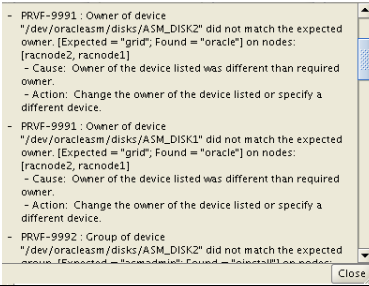
  • 원인
    • 가상화 환경 (Vitrtual_box) 에서 추가한 공유(shared_disk)디스크중 Vote disk 지정한 부분의 소유권자가 GI Owner 아닐때 발생하는 error
  • 해결
    • 가상 Disk 생성이후 vm 장착하고 Udev rules 설정할때 OWNER=""변수부분에 해당 grid IS 설치하는 사용자의 계정 이름을 넣어주고  re-load 시키면 정상적으로 작동환다
    • #vi /etc/udev/rules.d/99-oracle-asmdevice.rules

    • KERNEL=="sd?1", SUBSYSTEM=="block", PROGRAM=="/usr/lib/udev/scsi_id -g -u -d /dev/$parent", RESULT=="1ATA_VBOX_HARDDISK_VBe1e53a02-dba6b69a", SYMLINK+="vote-disk0", OWNER="oracle", GROUP="dba", MODE="0660"
      KERNEL=="sd?1", SUBSYSTEM=="block", PROGRAM=="/usr/lib/udev/scsi_id -g -u -d /dev/$parent", RESULT=="1ATA_VBOX_HARDDISK_VB331eb2cc-de12e65a", SYMLINK+="vote-disk1", OWNER="oracle", GROUP="dba", MODE="0660"
      KERNEL=="sd?1", SUBSYSTEM=="block", PROGRAM=="/usr/lib/udev/scsi_id -g -u -d /dev/$parent", RESULT=="1ATA_VBOX_HARDDISK_VBa07be0c4-b7d49397", SYMLINK+="vote-disk2", OWNER="oracle", GROUP="dba", MODE="0660"
      KERNEL=="sd?1", SUBSYSTEM=="block", PROGRAM=="/usr/lib/udev/scsi_id -g -u -d /dev/$parent", RESULT=="1ATA_VBOX_HARDDISK_VBb7a448da-a693e3ce", SYMLINK+="vote-disk3", OWNER="oracle", GROUP="dba", MODE="0660"
      KERNEL=="sd?1", SUBSYSTEM=="block", PROGRAM=="/usr/lib/udev/scsi_id -g -u -d /dev/$parent", RESULT=="1ATA_VBOX_HARDDISK_VBabee140e-83de56c1", SYMLINK+="asm-disk0", OWNER="oracle", GROUP="dba", MODE="0660"
      KERNEL=="sd?1", SUBSYSTEM=="block", PROGRAM=="/usr/lib/udev/scsi_id -g -u -d /dev/$parent", RESULT=="1ATA_VBOX_HARDDISK_VBd6c99a36-1ca38e75", SYMLINK+="asm-disk1", OWNER="oracle", GROUP="dba", MODE="0660"
      KERNEL=="sd?1", SUBSYSTEM=="block", PROGRAM=="/usr/lib/udev/scsi_id -g -u -d /dev/$parent", RESULT=="1ATA_VBOX_HARDDISK_VB20c4e33c-ae0e923c", SYMLINK+="asm-disk2", OWNER="oracle", GROUP="dba", MODE="0660"
      KERNEL=="sd?1", SUBSYSTEM=="block", PROGRAM=="/usr/lib/udev/scsi_id -g -u -d /dev/$parent", RESULT=="1ATA_VBOX_HARDDISK_VBc2c12265-aa5ce18f", SYMLINK+="asm-disk3", OWNER="oracle", GROUP="dba", MODE="0660"

      Disk 장치 내용 업데이트
      # /sbin/partprobe /dev/sdb1
      # /sbin/partprobe /dev/sdc1
      # /sbin/partprobe /dev/sdd1
      # /sbin/partprobe /dev/sde1
      # /sbin/partprobe /dev/sdf1
      # /sbin/partprobe /dev/sdg1
      # /sbin/partprobe /dev/sdh1
      # /sbin/partprobe /dev/sdi1

      Udev rules 재기동
      #udevadm control --reload-rules
    • ****update****

      2019-01-10
      Oracle 18c 설치중 ocr vote 디스크는 CRS GIMR 이루어지는데 "CRS" DISK 지정할 곳을 GI Owner 해야함
    • 상황은 VOTE 디스크에서 GIMR,CRS 나누어 저장할때 CRS 디스크 소유자가 GI 소유자가 아닐때 발생
  • 참고 MOS 문서번호 & 기타

PRVF-00002


  • 코드
    • PRVF-00002
  • 원인
    • JAVA Network 함수가 현재 local machine 대한 host 이름을 인식할수없을때 발생
  • 해결
    • /etc/hosts 파일에 ip hostname 적어준다

    • 192.168.xxx.xx         s-oel5-11204-3.locdomain
  • 참고 MOS 문서번호 & 기타
    • Cause: Unable to determine local host name using Java network functions.
      Action: Ensure that hostname is defined correctly using the 'hostname' command.

OUI-67073


  • 코드
    • OUI-67073
  • 원인

    • Window 환경에 설치된 Oracle 11.2.0.1 11.2.0.4 버전업 이후 patch 하는 과정에서 OPatch utility 사용해야할 파일들을 Process & Services 에서 사용중이라 사용할수 없어서 발생하는 Error
    • ---OPatch 수행될때 필요한 파일들이 이미 사용중이라 사용할수없음
    • 333
    • --Error 발생시 출력화면
  • 해결
    • 1-윈도우 + R services.msc 실행
    • 2-cmd 창을 open
    • 3-cmd 창에서 tasklist.exe /m ora*  검색해서 patch  사용해야할 파일을 사용중인 Process 찾는다
    • ---예시처럼 Process 들이 검색된다
    • 4-Process list 있는건 주로 oracle 필수 process 강제종료시 문제가 발생할수 있기때문에 1번에서 띄워둔 services.msc 에서 서비스 리스트를 우클릭 해서 속성을 들어감
    • 5-속성창의 "서비스 이름" 복사해서 cmd 창에서 stop 시킨다
    • C:\Task_data\28265827>net start OracleMTSRecoveryService
      OracleMTSRecoveryService 서비스를 시작합니다..
      OracleMTSRecoveryService 서비스가 잘 시작되었습니다.


      C:\Task_data\28265827>net start OracleServiceORA920
      OracleServiceORA920 서비스를 시작합니다...................
      OracleServiceORA920 서비스가 잘 시작되었습니다.


      C:\Task_data\28265827>net start OracleVssWriterORA920
      Oracle ORA920 VSS Writer Service 서비스를 시작합니다..
      Oracle ORA920 VSS Writer Service 서비스가 잘 시작되었습니다.
    • 6-해당 서비스들이 종료된것을 확인한 이후 다시 OPatch apply 수행하면  실행된다

      참고 Link

      Error 발생시 출력된 Log 첨부
  • 참고 MOS 문서번호 & 기타
    • OUI-67073:UtilSession 실패: Prerequisite check "CheckActiveFilesAndExecutables" failed.
    • --Error 발생시 출력되는 Log

ORA-39143


  • 코드
    • ORA-39143
  • 원인
    • Exp backup 받은 파일을 impdp 이용해 넣을려 할때 발생하는 Error
  • 해결
    • EXP 받은 dmp 파일이기때문에 imp 이용해 넣어야 한다
  • 참고 MOS 문서번호 & 기타
    • How To Solve Error: ORA-39143 (Doc ID 1288715.1)
      ORA-39001: invalid argument value
      ORA-39000: bad dump file specification
      ORA-39143: dump file "___File_Directory___" may be an original export dump file

ORA-39126


  • 코드
    • ORA-39126
  • 원인
    • Oracle 12c R1 설치이후 data pump사용시 발생
    • --설치가 정상적으로 이루어진것이 아닌 기존 Engine shutdown 하고 tar 묶어서 서버에 untar 해서 구축한 상황에서 발생함
    • ===정상 설치가 아닌 Engine 복사 형식의 설치로 인해 내부 procedure 정상적으로 compile 되지 않은 상황으로 보임===

    • 대상 Procedure & package
      =KUPW$worker.LOAD_MD_TRANSFORMS
      =SYS.DBMS_METADATA
  • 해결
    • Step - 1 - DB Shutdown
      =============
      SQL > shutdown immediate

      Step - 2 - startup migrate option
      ==============

      SQL > startup migrate

      Step - 2 - run recompile script
      ==============

      SQL > @?\rdbms\admin\catproc.sql
      SQL > @?\rdbms\admin\utlrp.sql
  • 참고 MOS 문서번호 & 기타
    • 위의 사진처럼 다양한 packaghe 에러로 impdp 동작하므로 하단의 packagee 수행시켜서 모두 Recompile 해준다

ORA-29807


  • 코드
    • ORA-29807
  • 원인
    • Oracle 9.2 version 에서 DBCA 통해 DB 생성할때 발생하는 에러로서 알려진 bug
  • 해결
    • MOS 문서 2686156 번으로 조회할수 있음, 알려진 ERROR 로써 ignore 버튼을 눌러서 계속 진행할수 있음
  • 참고 MOS 문서번호 & 기타
    • MOS 문서 2686156 
    • 29807,00000, "specified operator does not exist"
      // *Cause: The operator which has been specified does not exist.
      // *Action: Ensure that the operator that has been specified does exist.

ORA-28365


  • 코드
    • ORA-28365
  • 원인
    • RMAN 사용하지않고 Active DataGuard 구성중에 방생한 문제로 DB이름에 해당하는 디렉토리가 없을때 ORACLE WALLET ERROR 인식함
  • 해결
    • ORACLE REPORT BUG 로 기록된사항 MOS 14553109 버그로 조회가능한 사항으로

    • 1==$ORACLE_HOME/admin/복제_ db_unique_이름을 대문자로 디렉토리를 생성한다
      2==Sqlnet.ora 파일에 wallet 의 위치를 지정한다
  • 참고 MOS 문서번호 & 기타
    • 14553109

ORA-20000


  • 코드
    • ORA-20000
  • 원인
    • ORACLE 10.2.0.5에서 11.2.0.1 까지 존재하는 BUG
  • 증상
    • Alert_sid.log 파일에

    • *** ACTION NAME:(GATHER_STATS_JOB) 2019-02-26 22:00:09.040
      *** MODULE NAME:(DBMS_SCHEDULER) 2019-02-26 22:00:09.040
      *** SERVICE NAME:(SYS$USERS) 2019-02-26 22:00:09.040
      *** SESSION ID:(1356.49920) 2019-02-26 22:00:09.040
      WARNING:Could not lower the asynch I/O limit to 160 for SQL direct I/O. It is set to -1
      ORA-20000: Unable to set values for index SYS_MTABLE_000045D9E_IND_2: does not exist or insuffi
      cient privileges
      *** 2019-02-26 22:00:11.432
      GATHER_STATS_JOB: GATHER_TABLE_STATS('"SYSTEM"','"SYS_EXPORT_FULL_01"','""', ...)
      ORA-20000: Unable to set values for index SYS_MTABLE_000045D9E_IND_2: does not exist or insuffi
      cient privileges
      *** 2019-02-26 22:23:01.444
      WARNING:Could not lower the asynch I/O limit to 184 for SQL direct I/O. It is set to -1
      WARNING:Could not lower the asynch I/O limit to 168 for SQL direct I/O. It is set to -1

      처럼 날짜와 붉은색 문구가 반복됨
  • 해결
    • 11.2.0.2 이상 버전으로 UPGRADE
      10.2.0.5.2 PSU
      BUG 번호 9772888 포함된 Patch 
  • 참고 MOS 문서번호 & 기타
    • 'Warning:Could not Lower the Asynch I/O Limit to 224 for SQL direct I/O. It is set to -1' After Upgrading To 10.2.0.5 (Doc ID 1155445.1)

ORA-12514


  • 코드
    • ORA-12514
  • 원인
    • 12c에서 Tnsnames.ora 에도 해당 내용이 서술되어 있고 ping , ssh , tnsping 등이 모두 작동하지만 sqlplus id/pw@server_name  입력하면 접속이 되지 않을때 발생


    • $ vi /u01/app/oracle/product/12.2.0/dbhome_1/network/admin/tnsnames.ora
      RCAT6 =
        (DESCRIPTION =
      (ADDRESS_LIST =
        (ADDRESS = (PROTOCOL = TCP)(HOST = 192.168.56.6)(PORT = 1521))
      )
      (CONNECT_DATA =
        (SERVICE_NAME = backorcl)
      )
        )
  • 해결
    • 원격지 db(source에서 target으로 접속할때 target) listener.ora 하단 항목을 넣어줌

      SID_LIST_LISTENER =
      (SID_LIST =
      (SID_DESC =
      (SID_NAME=backorcl)
      (ORACLE_HOME = /u01/app/oracle/product/12.2.0.1/dbhome_1)
      )
      )
  • 참고 MOS 문서번호 & 기타
    • 12514, 00000, "TNS:listener does not currently know of service requested in connect descriptor"
      // *Cause:  The listener received a request to establish a connection to a
      // database or other service. The connect descriptor received by the listener
      // specified a service name for a service (usually a database service)
      // that either has not yet dynamically registered with the listener or has
      // not been statically configured for the listener.  This may be a temporary
      // condition such as after the listener has started, but before the database
      // instance has registered with the listener.
      // *Action:
      //  - Wait a moment and try to connect a second time.
      //  - Check which services are currently known by the listener by executing:
      //    lsnrctl services <listener name>
      //  - Check that the SERVICE_NAME parameter in the connect descriptor of the
      //    net service name used specifies a service known by the listener.
      //  - If an easy connect naming connect identifier was used, check that
      //    the service name specified is a service known by the listener.
      //  - Check for an event in the listener.log file.

ORA-09925


  • 코드
    • ORA-09925
  • 원인
    • RMAN DB 복제중 원격지에 audit디렉토리가 존재하지않을 때 발생한다 
  • 해결
    • $ORACLE_BASE/admin/sid/adump  bdump 폴더가 존재하지않을 때 발생하는 것으로 생성해주면 해결됨
  • 참고 MOS 문서번호 & 기타
    • // *Cause:  ORACLE was not able to create the file being used to hold
      //          audit trail records.
      // *Action: Check the UNIX error number for a possible operating system error.
      //          If there is no error, contact ORACLE customer support.

ORA-06508


  • 코드
    • ORA-06508
  • 원인
    • Oracle 12c R1 설치이후 data pump사용시 발생
      --설치가 정상적으로 이루어진것이 아닌 기존 Engine shutdown 하고 tar 묶어서 서버에 untar 해서 구축한 상황에서 발생함

      ===정상 설치가 아닌 Engine 복사 형식의 설치로 인해 내부 procedure 정상적으로 compile 되지 않은 상황으로 보임===
      대상 Procedure & package
      =KUPW$worker.LOAD_MD_TRANSFORMS
      =SYS.DBMS_METADATA
  • 해결
    • Step - 1 - DB Shutdown
      =============
      SQL > shutdown immediate

      Step - 2 - startup migrate option
      ==============

      SQL > startup migrate

      Step - 2 - run recompile script
      ==============

      SQL > @?\rdbms\admin\catproc.sql
      SQL > @?\rdbms\admin\utlrp.sql
  • 참고 MOS 문서번호 & 기타
    • 위의 사진처럼 다양한 packaghe 에러로 impdp 동작하므로 하단의 packagee 수행시켜서 모두 Recompile 해준다

ORA-04063


  • 코드
    • ORA-04063
  • 원인
    • Oracle 12c R1 설치이후 data pump사용시 발생
    • --설치가 정상적으로 이루어진것이 아닌 기존 Engine  shutdown 하고 tar 묶어서  서버에 untar 해서 구축한 상황에서 발생함
    • ===정상 설치가 아닌 Engine 복사 형식의 설치로 인해 내부 procedure 정상적으로 compile 되지 않은 상황으로 보임===

    • 대상 Procedure & package
      =KUPW$worker.LOAD_MD_TRANSFORMS
      =SYS.DBMS_METADATA
  • 해결
    • Step - 1 - DB Shutdown
      =============
      SQL > shutdown immediate

      Step - 2 - startup migrate option
      ==============

      SQL > startup migrate

      Step - 2 - run recompile script
      ==============

      SQL > @?\rdbms\admin\catproc.sql
      SQL > @?\rdbms\admin\utlrp.sql
  • 참고 MOS 문서번호 & 기타
    • 위의 사진처럼 다양한 packaghe 에러로 impdp 동작하므로 하단의 packagee 수행시켜서 모두 Recompile 해준다

ORA-01430


  • 코드
    • ORA-01430
  • 원인
    • Oracle 9.2 version 에서 DBCA 통해 DB 생성할때 발생하는 에러로서 알려진 bug 이다
  • 해결
    • Ignore 넘어갈수 있는 bug이다, 무시가능함
  • 참고 MOS 문서번호 & 기타
    • 01430, 00000, "column being added already exists in table"
      // *Cause:
      // *Action:
    •